How to Track Your Website’s Performance in AI Assistants: 5 Practical Options
- by Ilona K.

Table of contents
- How Website Performance in LLMs Changes Measurement
- 1. Measure AI Traffic in Google Analytics 4
- 2. Check AI Impressions in Google Search Console
- 3. Track Citations and Grounding Queries in Bing Webmaster Tools
- 4. Test Agentic Browsing with Google Lighthouse
- 5. Analyze Log Files for AI bots
- Build an AI Performance View Early
- FAQs
McKinsey research on AI search adoption found that half of consumers already use AI-powered search. Yet AI visibility can be difficult to measure because a brand mention does not always produce a website visit. Discover five free ways to measure AI performance, from referral traffic and citations to agent readiness and crawler activity.
How Website Performance in LLMs Changes Measurement
Traditional organic search performance of a website often centers on rankings, impressions, clicks, and conversions. Performance in LLMs adds other signals: whether a page is cited, whether a brand is mentioned, which grounding queries trigger visibility, and whether an AI agent can access the website.
No single free report covers the whole journey. AI performance for a website usually has five layers:
- Visibility: Did the brand appear in an AI-generated result?
- Access: Could AI bots (automated scripts that scan the internet to extract text, images, and data for training Large Language Models) and agents reach the content?
- Citation: Was a website page used as a source?
- Traffic: Did someone click through?
- Outcome: Did the visit produce a sale, inquiry, or other key event?
For example, northstarbakery.it.com may receive few ChatGPT visits while earning many citations in Copilot AI answers. Both figures matter, but they describe different stages of discovery.
1. Measure AI Traffic in Google Analytics 4
Google Analytics 4 added a dedicated AI Assistant channel in May 2026. Visits from recognized tools such as ChatGPT, Gemini, and Claude are automatically grouped under AI Assistant, with ai-assistant as the medium.
Here’s how to find it:
- Open the Traffic acquisition report.
- Filter the default channel group to AI Assistant.
- Compare sessions, engagement, key events, revenue, and landing pages.
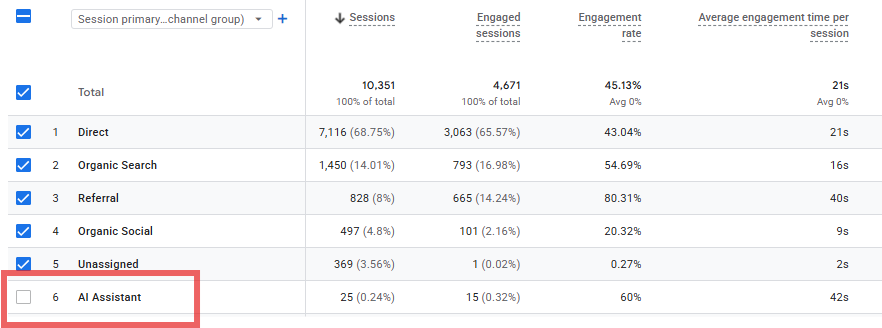
This shows whether AI visitors behave differently from organic search or social traffic. It only records clicks. A brand may appear in an answer without receiving a visit.
2. Check AI Impressions in Google Search Console
In June 2026, Google Search Console introduced generative AI performance reports for AI Overviews, AI Mode, and generative features in Discover.
The reports include impressions per page, visible pages, countries, devices, and performance over time. Google is initially rolling them out to a subset of websites.
Where available, this data can be compared with standard Search performance. A guide on brightdesk.it.com might gain frequent AI Mode impressions even when its traditional search clicks remain modest.
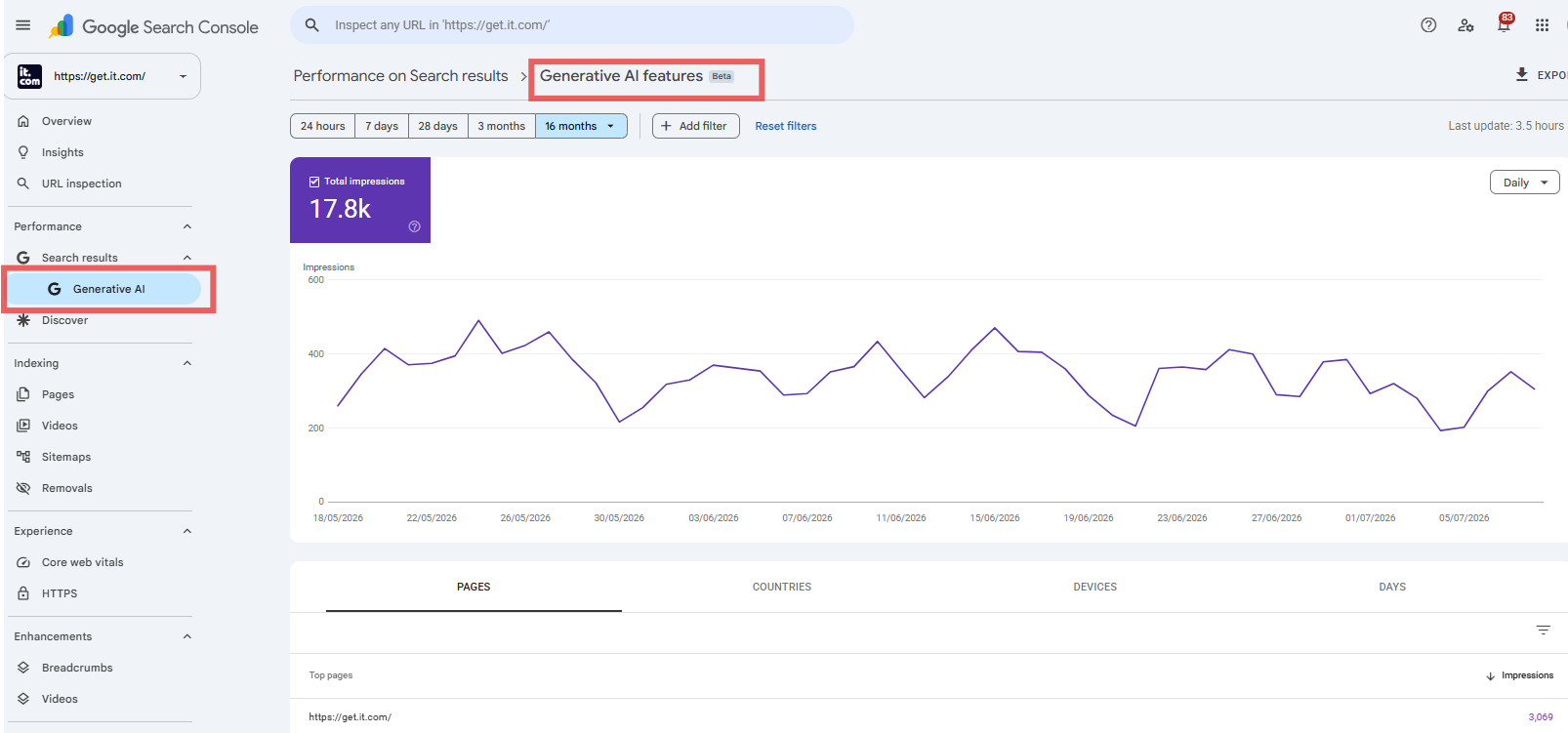
Google Search Console covers visibility inside Google, but doesn’t cover metrics in ChatGPT, Claude, Copilot, or Perplexity.
3. Track Citations and Grounding Queries in Bing Webmaster Tools
The free AI Performance dashboard in Bing Webmaster Tools reports total citations, average cited pages, grounding queries, page-level citation activity, visibility trends, and query-to-page mappings.
It’s a wider set of metrics compared to Google Search Console. However, the dashboard reflects Microsoft’s grounding ecosystem, and considering Microsoft’s relationship with OpenAI (the company behind ChatGPT), it’s a great tool to gather website-specific AI performance insights.
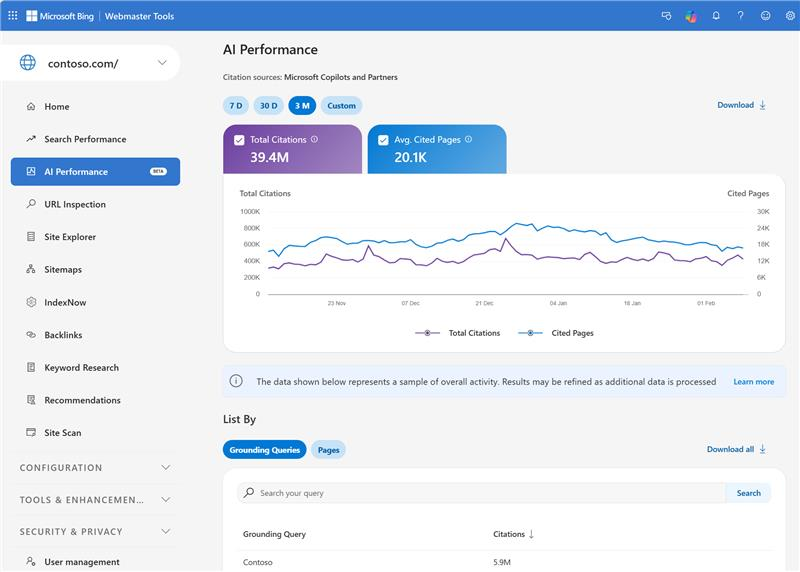
The setup involves three main stages:
- Add and verify the website in Bing Webmaster Tools.
- Open the AI Performance report.
- Review which URLs and grounding queries generate citations.
This can reveal that a comparison guide is often used as a source while an indexed product page is rarely cited.
4. Test Agentic Browsing with Google Lighthouse
The experimental Agentic Browsing category in Google Lighthouse (an open-source Google tool that analyzes the quality of web pages) tests how well a site supports machine interaction. It examines areas such as llms.txt discoverability, accessibility for agents, layout stability, and WebMCP implementation.
This is a readiness check rather than a traffic report. Lighthouse displays a fraction of checks passed and individual pass or fail results instead of a traditional 0-to-100 score.
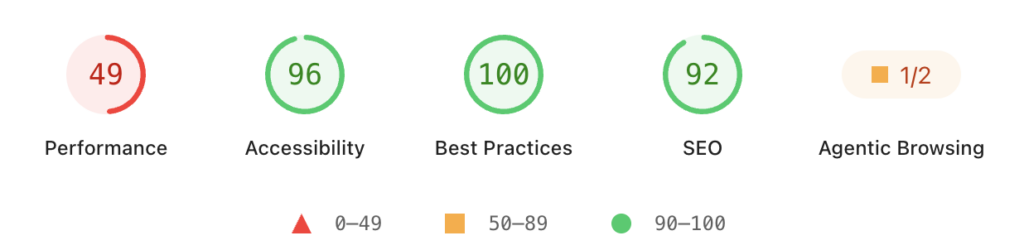
Testing requires Chrome 150 or later. Some WebMCP checks also rely on an origin trial because the standards remain experimental.
A strong result does not prove that AI platforms cite a site. It suggests that automated agents may face fewer technical barriers when reading or interacting with it.
5. Analyze Log Files for AI bots
Server logs record requests made to a website. The free Screaming Frog Log File Analyser can process up to 1,000 log events and identify crawled URLs, bot frequency, response codes, redirects, and slow pages.
The tool can also verify search engine and AI bot activity.
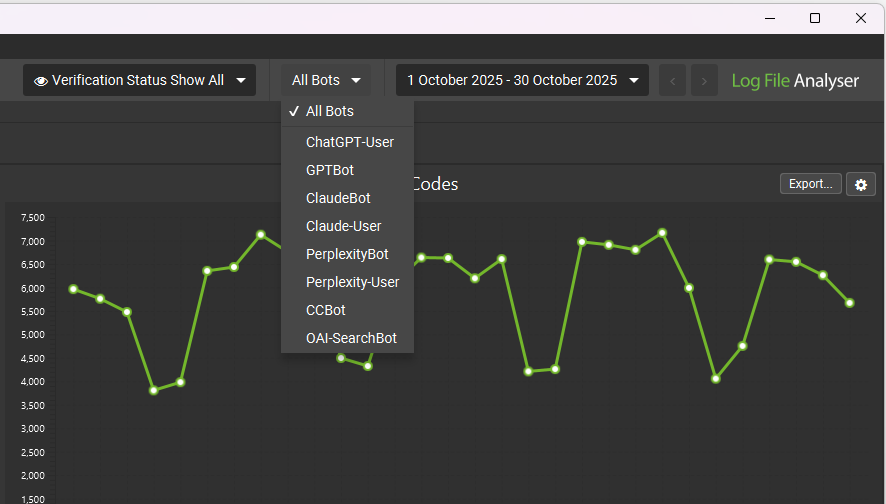
A simple workflow consists of:
- Exporting recent server log files from the hosting provider.
- Importing the files into the Log File Analyser.
- Filtering the data for verified AI or search bot user agents.
- Reviewing crawled pages, crawl frequency, and error codes.
The results can show whether bots reach important pages or repeatedly encounter 4XX and 5XX errors.
Log analysis confirms access, not citations. A crawl proves that a bot requested a page, but not that an AI answer used it.
Build an AI Performance View Early
Although there is no single place yet to evaluate your website’s presence across all LLMs, a lightweight monthly dashboard can combine AI Assistant sessions from GA4, AI impressions from Google Search Console, citations from Bing Webmaster Tools, Lighthouse checks, and AI bot crawl events.
Some data from those reports, alongside insights from other free Google tools can help produce a viable prompt research and page prioritisation for GEO (generative engine optimization).
More advanced GEO tools may become relevant when manual checks take too much time or when a business needs to compare visibility across many prompts, markets, or competitors.
Free AI measurement works as a collection of signals, not one perfect score. Together, these sources create a more balanced view of organic performance and AI performance without requiring a paid monitoring platform.
FAQs
How to check AI search visibility?
Google Search Console can show impressions from Google’s generative search features when the report is available. Bing Webmaster Tools can show citations, cited pages, grounding queries, and visibility trends. Manual tests using a fixed prompt list can add coverage for platforms without first-party reporting.
How to measure AI performance?
AI performance can be measured across visibility, citations, traffic, outcomes, and crawler access. Combining these metrics prevents one number from carrying too much meaning. Citation growth, for example, may show rising influence even when referral traffic remains small.
How to track AI traffic in Google Analytics 4?
The GA4 Traffic acquisition report can be filtered to the AI Assistant default channel group. Results can then be reviewed by source, landing page, engagement, key events, and revenue. Google automatically classifies recognized AI referrals using the ai-assistant medium.
How to track AI citations for free?
Bing Webmaster Tools provides free citation reporting through its AI Performance dashboard. It includes total citations, cited URLs, grounding queries, query-to-page mappings, and visibility trends.
How to track LLM mentions?
A basic free method uses a fixed set of priority prompts tested regularly across selected AI platforms. Each check can record whether the brand appeared, which competitors appeared, the tone of the answer, and whether a link or citation was included. Paid monitoring platforms automate more of this work, but manual tracking can establish an initial benchmark.
Want to see your website in ChatGPT? Visit it.com Domains blog and follow us on social media.

Read also
Tips and Tricks
Phishing with Fake Impersonating Domains: How Business Can Recognize It and Guard
- 10 min read

Tips and Tricks
AI Appreciation Day: Top-10 Domain Names for AI Startups on it.com Domains
- 3 min read