Phishing with Fake Impersonating Domains: How Business Can Recognize It and Guard
- by Ilona K.

Table of contents
Phishing is the technically simple scamming technique that causes damage to both consumers and businesses. Frauders trick people into revealing sensitive information such as passwords or credit card numbers often using fake impersonating domains for this. Companies lose reputation, customer trust, footfall and revenue. Fighting these attacks is difficult, but there are several ways to protect both your business, and your customers.
Phishing remains one of the most common forms of cyberattacks, directly impacting both users and businesses. According to research by Zensec, a UK-based cybersecurity company, in 2025, over 90% of cyberattacks began with phishing.
Unlike sophisticated technical hacks, phishing relies on trust and lack of attention. Attackers create convincing scenarios and fake links (domains) to trick people into clicking and voluntarily sharing sensitive data.
In the domain industry, this threat is particularly significant, as domain names become a tool for deception as a means of disguising attacks. Fraudsters use names that are similar to those of existing companies, exploiting their email addresses and branding to deceive users.
While phishing can’t be completely eliminated, there are steps businesses can take to protect themselves and significantly reduce the likelihood of their brand and domain being used for phishing.
What Is Phishing?
Phishing is a form of cyber fraud in which an attacker attempts to gain access to confidential information such as passwords, banking data, verification codes, or internal corporate systems.
For example, scammers send fake emails and messages, posing as well-known companies or familiar individuals. The messages contain links to fake websites and malicious files. Clicking a link or opening a file will result in the data being compromised. Alternatively, the links themselves may be disguised as the domain names of well-known companies or services.
Phishing links are most often delivered via emails, SMS, messaging apps, or even social media. They typically mimic well-known brands such as Amazon, banks, or popular online services. For instance, a user might receive a message like ‘Your Amazon account has been locked. Verify now: amaz0n-security-check.com’ or an email claiming to be from a bank with a link such as secure-login-yourbank.net instead of the official domain. Another common scenario is a fake delivery notification ‘Your package could not be delivered. Track here: dhl-track-parcel.info.’
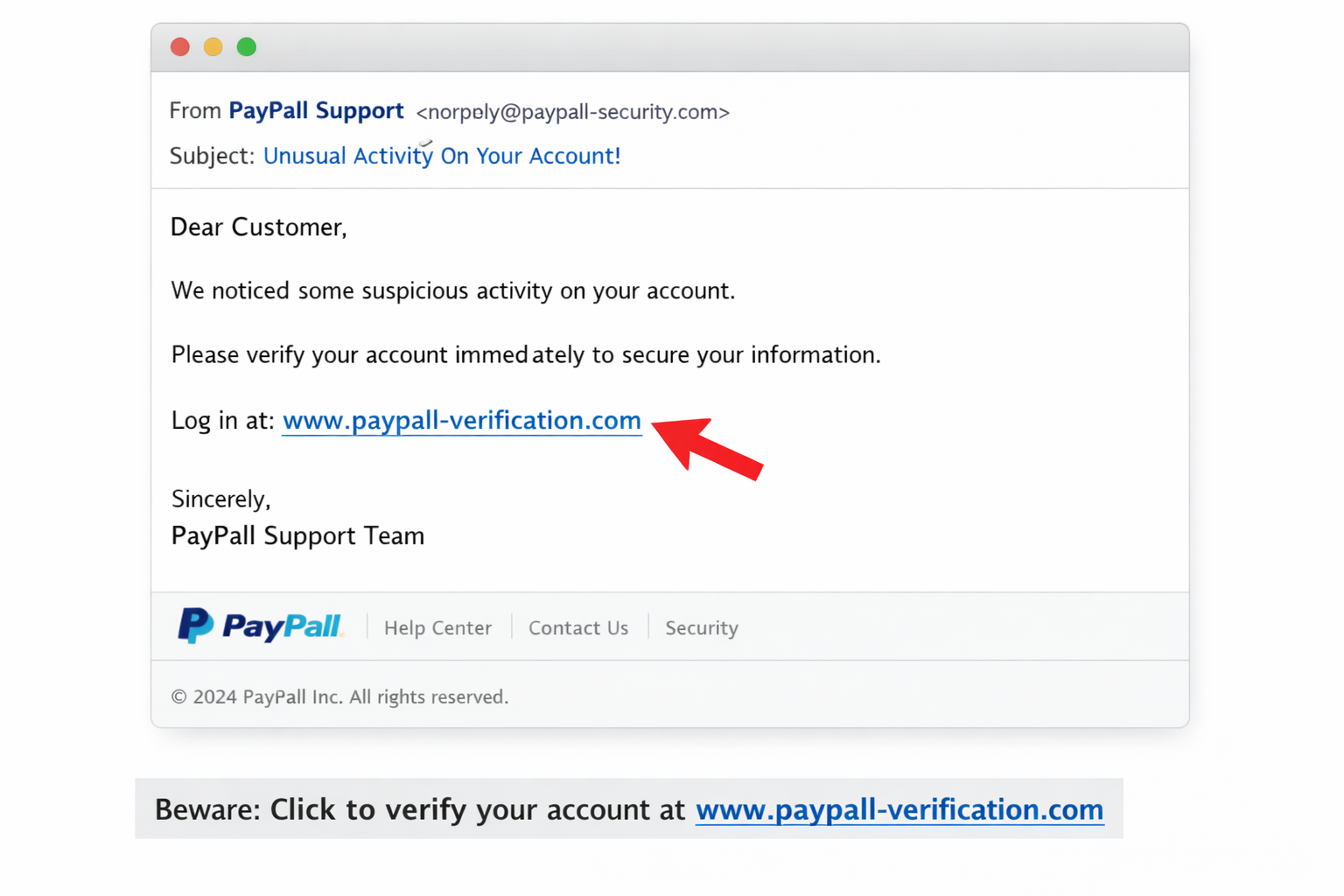
The more popular and well-known a company is, the more likely it is that scammers will use its brand and spoof its domain. According to Check Point Research’s Brand Phishing Report for Q3 2025, attackers most often impersonate large tech companies, with brands like Microsoft (40%), Google (9%), and Apple (6%) consistently ranking among the top targets.
The main danger of phishing is not a forced security breach. Instead, users voluntarily ‘unlock the door’ granting the attacker access to their data. This makes attacks scalable and effective even without sophisticated technical tools.
For businesses, phishing poses a systemic threat. Compromising a single account can become a point of entry into the company’s internal infrastructure. Through phishing emails, attackers gain access to corporate emails, financial transactions, and internal documents. Using this information, they can instill greater trust in the users they’re trying to deceive, making it easier to achieve their goals.
One more serious risk of phishing is reputational. If customers encounter phishing sites that imitate a company’s brand, their trust level drops, even if the company itself hasn’t been directly compromised. This can impact website traffic, trust in email correspondence, and business revenue.

Understanding the Types of Phishing
There are many types of phishing, but here are a few common basic varieties:
- Mass email phishing, which involves sending large numbers of identical emails with a fake link purporting to be from a well-known service. After clicking the ‘infected’ link, the scammers gain access to the victim’s personal information. The main goal is to reach as many users as possible.
- Spear phishing typically targets specific individuals or companies. Fraudsters prepare for the scam for a long time, trying to learn as much information about the victim as possible to convince them their messages are genuine. Communications incorporate important information giving context, such as job titles, partners, and current business operations.
- Multi-stage attacks combine several channels: email, websites, and additional confirmation via SMS or phone call. This approach can increase user trust and reduce the likelihood of fraudulent activity being detected.
- Website phishing occurs through fake web pages that mimic the interface and domain name of legitimate services. The user enters data unaware of the deception, as it's usually quite difficult to distinguish fake websites from real ones.
While phishing can take many forms, most attacks ultimately rely on impersonating the websites of companies and brands. These, in turn, depend on deceptive domain names, which makes domains a key element in both carrying out attacks and preventing them.
Phishing Domain Names and How to Recognize Them
In many phishing attacks, domain names are the first thing that shapes a user’s perception of a website’s legitimacy. A striking example is a coordinated campaign in 2025 that targeted at least 18 U.S. universities, where attackers used nearly 70 different phishing domains to impersonate official login portals and steal credentials from students and staff, even bypassing multi‑factor authentication (MFA) protections. This campaign ran for several months and affected institutions including the University of California (Santa Cruz and Santa Barbara), the University of San Diego, Virginia Commonwealth University, and the University of Michigan.
Frauders also often exploit major events for phishing attacks. For instance, cybercrime spikes during Black Friday. In 2024, domain registrations between October and November increased by 188%, and one in eleven domains registered during this period were classified as malicious. During the discount season, criminals registered domains like ‘hokablackfriday.com’ (HOKA is an athletic footwear brand), completely replicating the logos and products of famous brands on fake websites, and offering super-deal deals. These websites acted as honeypots to harvest logins and credit card information.
Unfortunately, the widespread use of domains for fraudulent purposes reduces trust in domain zones, increasing regulatory scrutiny and causing a higher rate of domain blocking. This affects both registrars and legitimate domain owners.
However, a number of characteristic techniques employed by scammers make phishing domains identifiable. Tactics used by attackers include:
- Typosquatting: One of the most common methods. Attackers use domain names with typos or minor differences from the original, such as ‘cornmpany’ or ‘compnay’ instead of ‘company’. Users may not immediately notice such errors and click through to a malicious site.
- Homographing: This method uses visually similar characters from different alphabets (Latin, Greek, Cyrillic, etc.) in the domain, making it difficult to detect a counterfeit. For example, the Greek ‘ο’ and the Latin ‘o’ look indistinguishable, but to a computer, they are two different letters because they are different characters in Unicode.
- Adding specific words: Attackers add words like login, secure, verify, and account to the names of well-known brands and companies to create the impression of an official service.
- Using alternative domain extensions: Instead of traditional extensions, lesser-known or new ones are used, where it is easier to register the desired name. These are usually either very cheap or free domain extensions. ICANN (Internet Corporation for Assigned Names and Numbers) monitors security and periodically purges these extensions, but unfortunately, not often enough to prevent this form of attack.
- Short-lived domains. Phishing sites often have short lifespans: domains are registered, used for one attack, and then quickly abandoned.
To stay safe, users should always check the full domain name carefully. For instance, amazon.com.secure-login.net isn’t the same as amazon.com, and paypaI.com (with a capital ‘i’ instead of lowercase letter ‘l’) is a classic homograph trick. It’s safer to avoid clicking on links in unexpected messages and instead type the official website address directly into the browser or use a saved bookmark. Users should also be cautious of messages that create urgency, such as threats of account suspension or unexpected charges, and verify such requests through official channels before taking any action.
Understanding what phishing domains look like helps businesses recognize them at first sight and report them to your registrar or the UDRP (Uniform Domain Name Dispute Resolution Policy). This is one step toward protecting your domain and business from attackers. Regularly checking domain name registrations similar to your brand name allows you to identify potential threats at an early stage.
There are special tools for domain monitoring and brand protection that automate this process.
These tools continuously scan newly registered domains, SSL certificate logs, and DNS data to identify lookalike domains, including typosquatting, homograph attacks, and suspicious combinations with brand keywords.
Among commonly used solutions are platforms like ZeroFox, Infoblox, Zensec, among similar brand protection services. They allow businesses to:
- detect suspicious domains shortly after registration;
- identify active phishing websites and spoofed resources;
- receive alerts about potential threats;
- and automate rapid takedown procedures.
That’s why, in practice, effective protection usually combines automated monitoring tools with a clear incident response process: detect - verify - report - take down.
How Businesses Can Protect Themselves from Phishing

In addition to domain monitoring, there are several other effective measures you can take to protect your brand from phishing:
- Choosing a clear and easily recognizable domain.This is one of the simplest and first steps to help you begin building your defense against phishing. Short, simple, and memorable domains are easier for users to recognize and harder for attackers to convincingly mimic. Conversely, long or complex domain names can give scammers more opportunities to create typosquatted or visually confusing variants.
- Registering protective domains. Companies can register variants of their primary domain with typos, alternative zones, and keywords to reduce the risk of their use by attackers. Some businesses also register their primary domain in multiple extensions.
- Setting up email authentication. SPF (Sender Policy Framework), DKIM (DomainKeys Identified Mail), and DMARC (Domain Based Message Authentication, Reporting and Conformance) configurations help prevent corporate email address spoofing and reduce the effectiveness of phishing emails sent in the company’s name.
- Rapid incident response. If a phishing domain is detected, it is important to promptly initiate blocking procedures through your registrar or hosting provider.
- Choosing reliable registrars and services. Providers with advanced security systems and support for abuse response procedures can significantly reduce the lifespan of phishing resources. Therefore, it’s important to carefully select the domain extension and the service where you intend to register your domain. Read reviews, policies, and try to find out how quickly the support team responds to make the right choice.
While even the combined efforts of the entire domain community cannot completely defeat phishing, this threat can be combated and your business protected.
FAQs
What is phishing?
Phishing is a method of fraud in which an attacker attempts to gain access to confidential information such as passwords, banking data, verification codes, or internal corporate systems using fake domain names, websites, and emails.
Is it possible to completely protect yourself from phishing?
No, it’s impossible to completely eliminate the risk. However, a well-designed combination of technical measures and careful user behavior can significantly reduce the likelihood of an attack.
Can attackers use my domain?
Most often, attackers register domains that look similar to the original, but with typos or different domain extensions.
What should you do if a phishing website using your brand is detected?
You should report the violation and contact the registrar or hosting provider as soon as possible to block the resource.
Looking for more tips to protect your business online? Visit it.com Domains blog and contact us on social media.

Read also

Tips and Tricks
AI Appreciation Day: Top-10 Domain Names for AI Startups on it.com Domains
- 3 min read